 播面
播面 在 Next.js 中如何处理跨域 (CORS) 问题?
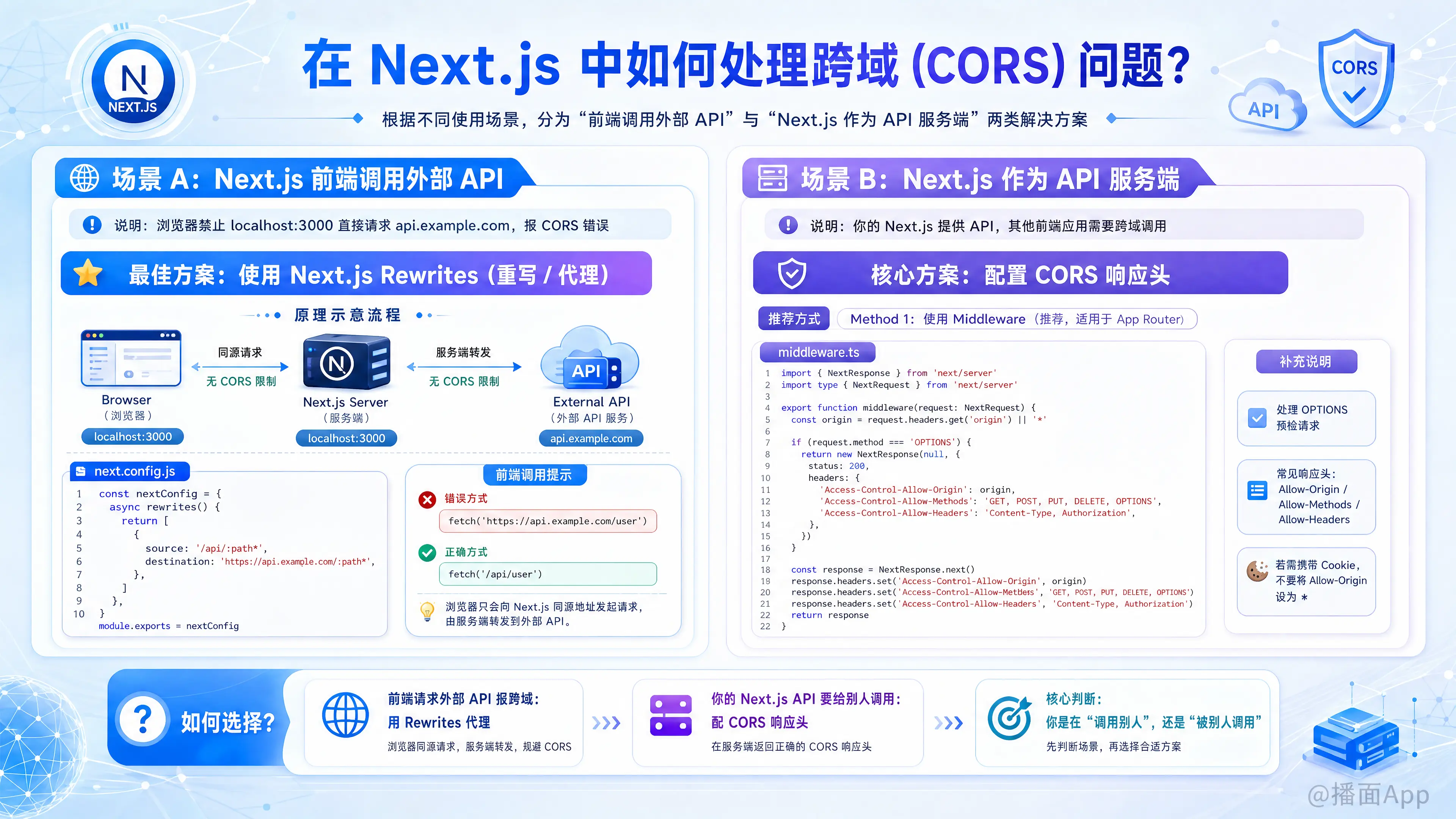
在 Next.js 中处理跨域(CORS)问题,主要取决于你的使用场景。通常有两种完全不同的情况:
- 场景 A(代理转发): 你的 Next.js 前端需要调用外部 API(例如 Java/Go/Python 后端),但浏览器报 CORS 错误。
- 场景 B(作为服务端): 你的 Next.js 提供了 API 接口,其他前端应用(如 App 或其他网站)来调用你的接口,你需要允许它们跨域。
以下是针对这两种场景的详细解决方案:
场景 A:Next.js 前端调用外部 API (解决开发环境跨域)
这是最常见的情况。浏览器禁止 localhost:3000 直接请求 api.example.com。
最佳解决方案:使用 Next.js Rewrites (重写/代理)
原理:利用 Next.js 的服务端作为中转。浏览器请求 Next.js (同源),Next.js 服务端请求外部 API (服务端之间没有 CORS 限制)。
在 next.config.js 中配置:
javascript
/** @type {import('next').NextConfig} */
const nextConfig = {
  async rewrites() {
    return [
      {
        // 接口请求的前缀,比如前端请求 /api/user
        source: '/api/:path*',
        // 转发到的目标地址,实际请求 https://example.com/user
        destination: 'https://api.example.com/:path*',
      },
    ]
  },
}

module.exports = nextConfig
前端调用方式:
javascript
// 不要直接写 https://api.example.com/user
// 而是写相对路径,Next.js 会自动转发
fetch('/api/user')
场景 B:Next.js 作为 API 服务端 (允许他人跨域调用)
如果你在使用 Next.js 的 API Routes (App Router 或 Pages Router) 开发接口,并且希望其他域名能调用你的接口,你需要配置响应头。
方法 1:使用 Middleware (推荐,适用于 App Router)
使用中间件可以全局或针对特定路径处理 CORS,包括处理 OPTIONS 预检请求。
创建 middleware.ts (在 src/ 或根目录下):
typescript
import { NextResponse } from 'next/server'
import type { NextRequest } from 'next/server'

export function middleware(request: NextRequest) {
  // 获取 origin,或者设置为 '*' 允许所有
  const origin = request.headers.get('origin') || '*'

  // 处理 OPTIONS 预检请求 (浏览器在发送 POST/PUT/DELETE 前会先发 OPTIONS)
  if (request.method === 'OPTIONS') {
    return new NextResponse(null, {
      status: 200,
      headers: {
        'Access-Control-Allow-Origin': origin,
        'Access-Control-Allow-Methods': 'GET, POST, PUT, DELETE, OPTIONS',
        'Access-Control-Allow-Headers': 'Content-Type, Authorization',
        'Access-Control-Max-Age': '86400',
      },
    })
  }

  // 处理实际请求
  const response = NextResponse.next()

  // 添加 CORS 头
  response.headers.set('Access-Control-Allow-Origin', origin)
  response.headers.set('Access-Control-Allow-Methods', 'GET, POST, PUT, DELETE, OPTIONS')
  response.headers.set('Access-Control-Allow-Headers', 'Content-Type, Authorization')

  return response
}

// 配置匹配路径,只对 /api 开头的路由生效
export const config = {
  matcher: '/api/:path*',
}
方法 2:在 next.config.js 中配置 Headers (静态配置)
如果你不需要动态判断 Origin,可以直接在配置文件中写死。
javascript
/** @type {import('next').NextConfig} */
const nextConfig = {
  async headers() {
    return [
      {
        // 匹配所有 API 路由
        source: "/api/:path*",
        headers: [
          { key: "Access-Control-Allow-Credentials", value: "true" },
          { key: "Access-Control-Allow-Origin", value: "*" }, // 或者指定具体域名
          { key: "Access-Control-Allow-Methods", value: "GET,DELETE,PATCH,POST,PUT" },
          { key: "Access-Control-Allow-Headers", value: "X-CSRF-Token, X-Requested-With, Accept, Accept-Version, Content-Length, Content-MD5, Content-Type, Date, X-Api-Version" },
        ]
      }
    ]
  }
}

module.exports = nextConfig
方法 3:在单个 API Route 中处理 (App Router)
如果你只想在某个特定的路由允许跨域:
typescript
// app/api/route.ts
import { NextResponse } from 'next/server'

export async function GET() {
  return NextResponse.json(
    { message: 'Hello' },
    {
      status: 200,
      headers: {
        'Access-Control-Allow-Origin': '*',
        'Access-Control-Allow-Methods': 'GET, POST, PUT, DELETE, OPTIONS',
        'Access-Control-Allow-Headers': 'Content-Type, Authorization',
      },
    }
  )
}

// 必须手动处理 OPTIONS 请求
export async function OPTIONS() {
  return NextResponse.json({}, {
    headers: {
      'Access-Control-Allow-Origin': '*',
      'Access-Control-Allow-Methods': 'GET, POST, PUT, DELETE, OPTIONS',
      'Access-Control-Allow-Headers': 'Content-Type, Authorization',
    },
  })
}
总结:我该选哪种?
| 你的需求 | 推荐方案 |
|---|---|
| 前端请求报错,想调外部 API | 场景 A: next.config.js Rewrites (最简单,无需修改后端) |
| 我是后端,想开放 API 给别人用 | 场景 B: Middleware (最灵活,统一管理) |
| 我是后端,只需简单的全局开放 | 场景 B: next.config.js Headers |
注意:
Next.js 的 Server Actions (服务器端操作) 默认是同源的。如果你想从外部调用 Server Actions,通常不建议这么做,应该使用 API Routes。