 播面
播面 Spring Boot 如何支持跨域请求(CORS)?
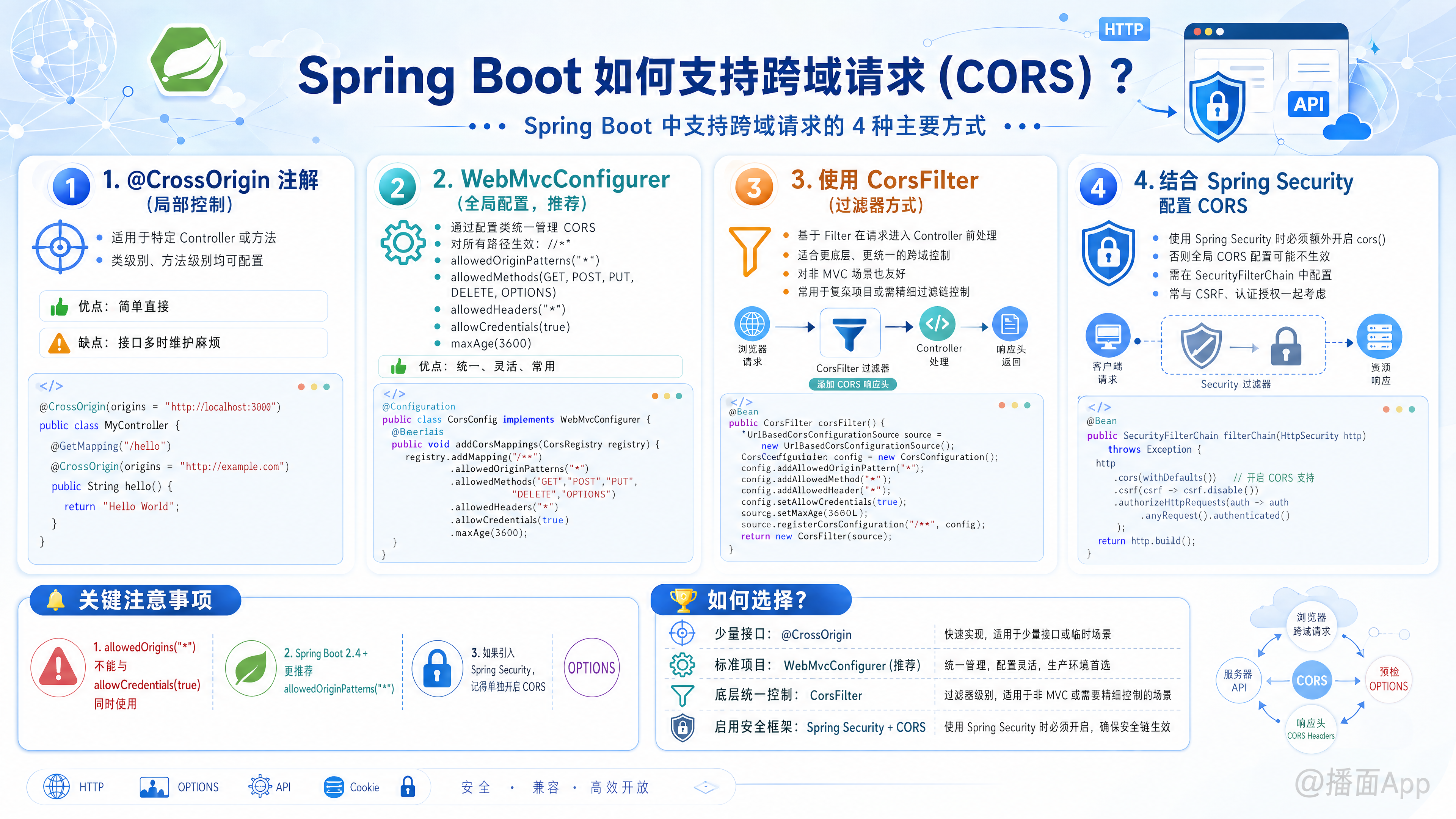
在 Spring Boot 中,跨域资源共享(CORS, Cross-Origin Resource Sharing)可以通过多种方式进行配置。通常取决于你的需求是针对单个接口、全局配置,还是结合了 Spring Security。
以下是 Spring Boot 支持跨域请求的 4 种主要方式:
1. 使用 @CrossOrigin 注解(细粒度/局部控制)
这是最简单的方式,适用于只需要让特定 Controller 或 特定方法 支持跨域的场景。
示例代码:
java
import org.springframework.web.bind.annotation.CrossOrigin;
import org.springframework.web.bind.annotation.GetMapping;
import org.springframework.web.bind.annotation.RestController;

@RestController
// 方式 A: 在类级别添加,所有方法都生效
@CrossOrigin(origins = "http://localhost:3000")
public class MyController {

    @GetMapping("/hello")
    // 方式 B: 仅在方法级别添加
    @CrossOrigin(origins = "http://example.com")
    public String hello() {
        return "Hello World";
    }
}- 优点:简单直接,无需额外配置类。
- 缺点:如果接口很多,每个都加注解很麻烦,且不易统一管理。
2. 实现 WebMvcConfigurer 接口(全局配置,推荐)
这是最常用的方式。通过配置类定义全局的 CORS 规则,适用于标准的 Spring MVC 项目。
示例代码:
java
import org.springframework.context.annotation.Configuration;
import org.springframework.web.servlet.config.annotation.CorsRegistry;
import org.springframework.web.servlet.config.annotation.WebMvcConfigurer;

@Configuration
public class CorsConfig implements WebMvcConfigurer {

    @Override
    public void addCorsMappings(CorsRegistry registry) {
        registry.addMapping("/**") // 对所有路径生效
                // .allowedOrigins("*") // 允许所有源地址(不安全,且不能与 allowCredentials(true) 同时使用)
                .allowedOriginPatterns("*") // SpringBoot 2.4.0+ 推荐使用这个代替 allowedOrigins("*")
                .allowedMethods("GET", "POST", "PUT", "DELETE", "OPTIONS") // 允许的请求方法
                .allowedHeaders("*") // 允许的请求头
                .allowCredentials(true) // 是否允许携带 Cookie
                .maxAge(3600); // 预检请求(OPTIONS)的缓存时间,单位秒
    }
}- 优点:统一管理,配置灵活。
- 注意:如果你引入了 Spring Security,这种配置可能会失效(被 Security 拦截),需要配合第 3 种方式。
3. 结合 Spring Security 的配置(如果使用了 Security)
如果你的项目中引入了 spring-boot-starter-security,请求会先经过 Security 的过滤器链。如果 Security 拒绝了 CORS 的预检请求(OPTIONS),上面的 MVC 配置就无法生效。
你需要同时在 Security 过滤器链中开启 CORS 支持。
示例代码:
java
import org.springframework.context.annotation.Bean;
import org.springframework.context.annotation.Configuration;
import org.springframework.security.config.annotation.web.builders.HttpSecurity;
import org.springframework.security.web.SecurityFilterChain;
import org.springframework.web.cors.CorsConfiguration;
import org.springframework.web.cors.CorsConfigurationSource;
import org.springframework.web.cors.UrlBasedCorsConfigurationSource;

import java.util.Arrays;
import java.util.Collections;

@Configuration
public class SecurityConfig {

    @Bean
    public SecurityFilterChain filterChain(HttpSecurity http) throws Exception {
        http
            // 开启跨域支持,默认会找名为 corsConfigurationSource 的 Bean
            .cors(cors -> cors.configurationSource(corsConfigurationSource()))
            .csrf(csrf -> csrf.disable()) // 通常前后端分离会关闭 CSRF
            .authorizeHttpRequests(auth -> auth.anyRequest().authenticated());

        return http.build();
    }

    @Bean
    public CorsConfigurationSource corsConfigurationSource() {
        CorsConfiguration configuration = new CorsConfiguration();
        configuration.setAllowedOriginPatterns(Collections.singletonList("*")); // 允许的源
        configuration.setAllowedMethods(Arrays.asList("GET", "POST", "PUT", "DELETE", "OPTIONS"));
        configuration.setAllowedHeaders(Collections.singletonList("*"));
        configuration.setAllowCredentials(true);

        UrlBasedCorsConfigurationSource source = new UrlBasedCorsConfigurationSource();
        source.registerCorsConfiguration("/**", configuration);
        return source;
    }
}
4. 使用 CorsFilter Bean(过滤器方式)
这种方式优先级很高,因为它是在过滤器链层面处理的。如果你没有使用 Spring Security,但希望 CORS 配置早于 Controller 执行,可以使用这种方式。
示例代码:
java
import org.springframework.context.annotation.Bean;
import org.springframework.context.annotation.Configuration;
import org.springframework.web.cors.CorsConfiguration;
import org.springframework.web.cors.UrlBasedCorsConfigurationSource;
import org.springframework.web.filter.CorsFilter;

@Configuration
public class CorsFilterConfig {

    @Bean
    public CorsFilter corsFilter() {
        CorsConfiguration config = new CorsConfiguration();
        config.addAllowedOriginPattern("*");
        config.addAllowedHeader("*");
        config.addAllowedMethod("*");
        config.setAllowCredentials(true);

        UrlBasedCorsConfigurationSource source = new UrlBasedCorsConfigurationSource();
        source.registerCorsConfiguration("/**", config);

        return new CorsFilter(source);
    }
}
总结:应该选哪种?
- 简单测试 / 单个接口:使用
@CrossOrigin注解。 - 普通 Spring Boot 项目(无 Security):使用
WebMvcConfigurer全局配置。 - 包含 Spring Security 的项目:必须在
SecurityFilterChain中配置.cors(),并定义CorsConfigurationSourceBean。
常见坑点提示
allowedOrigins("*")与allowCredentials(true):
在较新的 Spring Boot 版本中,为了安全性,不能同时将 Origin 设为*且允许携带凭证(Cookie)。- 解决办法:使用
allowedOriginPatterns("*")代替allowedOrigins("*"),或者明确指定具体的域名(如http://localhost:3000)。
- 解决办法:使用