 播面
播面 React 中组件间通信有哪些方式?
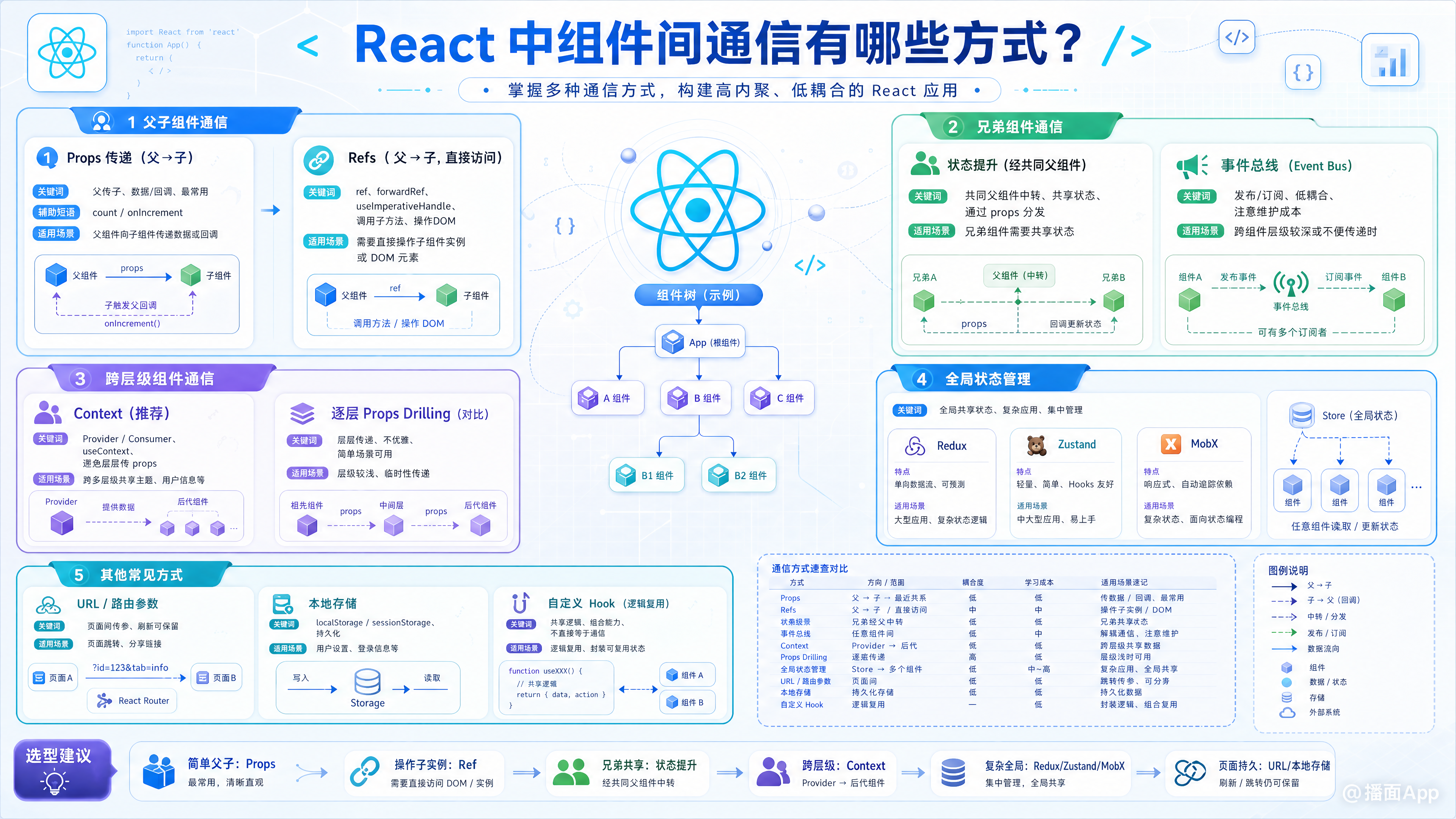
在 React 中,组件间通信的方式主要取决于组件的层级关系(父子、兄弟、跨层级等)。以下是常见的通信方式及其适用场景:
1. 父子组件通信
(1) Props 传递(父 → 子)
父组件通过 props 向子组件传递数据或方法。
- 适用场景:父传子数据/回调函数。
- 示例:
// 父组件
function Parent() {
  const [count, setCount] = useState(0);
  return <Child count={count} onIncrement={() => setCount(c => c + 1)} />;
}

// 子组件
function Child({ count, onIncrement }) {
  return (
    <div>
      <p>Count: {count}</p>
      <button onClick={onIncrement}>+</button>
    </div>
  );
}
(2) Refs(父 → 子,直接访问 DOM/实例)
父组件通过 ref 获取子组件的 DOM 节点或实例方法(需配合 forwardRef)。
- 适用场景:调用子组件的方法或直接操作 DOM。
- 示例:
import { useRef, forwardRef } from 'react';

// 子组件(使用 forwardRef)
const Child = forwardRef((props, ref) => {
  useImperativeHandle(ref, () => ({
    focusInput: () => inputRef.current.focus(),
    getValue: () => inputRef.current.value,
  }));

  const inputRef = useRef();
  return <input ref={inputRef} />;
});

// 父组件
function Parent() {
  const childRef = useRef();

  const handleClick = () => {
    childRef.current.focusInput(); // 调用子组件方法
    console.log(childRef.current.getValue()); //
    获取值

};

return (
<Child ref={childRef} />
<button onClick={handleClick}>Focus Input</button>
);
}
2.
兄弟组件通信
(1)
状态提升(通过共同的父组件中转)
将共享状态提升到最近的共同父组件中,通过 props
向下传递状态和修改方法。
适用场景:兄弟组件需要共享状态时。
示例:
//
共同父组件

function Parent() {

const [message, setMessage] = useState('');

return (

<div>

<SiblingA message={message} />

<SiblingB onUpdateMessage={(newMsg) => setMessage(newMsg)} />

</div>

);

}

//
兄弟 A:接收消息

function SiblingA({ message }) {

return <div>Received: {message}</div>;

}

//

兄弟 B:发送消息

function SiblingB({ onUpdateMessage }) {

return (

<input onChange={(e) => onUpdateMessage(e.target.value)} placeholder="Type..." />

);

}
(2) Context API
当多个层级的兄弟/跨层级组件需要共享状态时,可使用 Context API
避免逐层 props drilling。
-
步骤:创建 Context → Provider
提供数据 → Consumer/useContext
消费数据。
-
示例:
import { createContext, useContext } from 'react';

//

创建 Context

const ThemeContext = createContext();

//

Provider

包装根节点

function App() {

const theme = { color: 'blue', size: 'large' };

return (

<ThemeContext.Provider value={theme}>

<ComponentA />

</ThemeContext.Provider>

);

}

//

深层嵌套的兄弟/后代组件消费 Context


function ComponentA() {

const theme = useContext(ThemeContext); //


直接使用 hook


return <ComponentB />;

}

function ComponentB() {

const theme = useContext(ThemeContext); //


无需逐层传递 props


return <div style={{ color: theme.color }}>Themed Text</div>;

}
3.
跨层级/全局通信
(1) Redux / Zustand / Jotai(第三方状态管理库)
适用于大型应用中复杂的全局状态管理,所有组价均可访问和修改全局状态。
-
核心思想:单一数据源 + actions/mutations
更新状态 + connect/hooks
连接视图与状态。
-
优势:可预测的状态变化、中间件支持、调试工具丰富。
(2) Event Bus(事件总线)
自定义事件机制实现任意组件的发布订阅模式(需注意内存泄漏)。
-
实现方式:使用第三方库如 mitt/eventemitter3,或原生 EventTarget。
-
示例(mitt):
import mitt from 'mitt';

const emitter = mitt();

//

发布者(任意位置)

emitter.emit('userLogin', { name: 'Alice' });

//

订阅者(任意位置)

useEffect(() => {

const handler = (data) => console.log('User logged in:', data);

emitter.on('userLogin', handler);


return () => emitter.off('userLogin', handler); //


清理监听


}, []);
4.
其他特殊场景
(1) Children Props(插槽模式)
通过 props.children
向子组件中插入内容,常用于布局容器或高阶组件的配置化渲染。
function Card({ children }) {

return <div className="card">{children}</div>;

}

//

使用时插入内容


<Card>

<h2>Title</h2>


<p>Content...</p>


</Card>;
(2) Render Props(函数作为 props)
通过将一个函数作为 prop传递给子组价,让子组价动态决定渲染逻辑(已被 Hooks替代部分场景)。
class MouseTracker extends React.Component {

state = { x: , y: };


render() {

return this.props.render(this.state); //


执行 render prop


}


}


//使用:

<MouseTracker render={(mouse) =>
<div>Mouse position:
{mouse.x}, {mouse.y}</div>} />
###总结各方式的适用场景:
| 方式 | 适用场景 |
|---|---|
| Props | 父子单向数据流 |
| State Lifting | 兄弟/近邻组价共享状态 |
| Context API | 多层级轻量级全局状态 |
| Redux/Zustand等库 | 大型应用复杂全局状 |
| Event Bus | 简单跨组价解耦通信 |
| Children/Render Props | 灵活的内容注入 |
选择时需根据项目规模、复杂度及团队技术栈权衡,优先使用官方方案(如 Props、Hooks、Context),避免过度设计;大型应用再引入成熟的状态管理库。
以上内容仅供参考,应当根据实际情况进行修改。如果还有其他问题或者需要补充更多细节,欢迎随时告诉我