 播面
播面 Spring Boot 中如何解决跨域(CORS)问题?
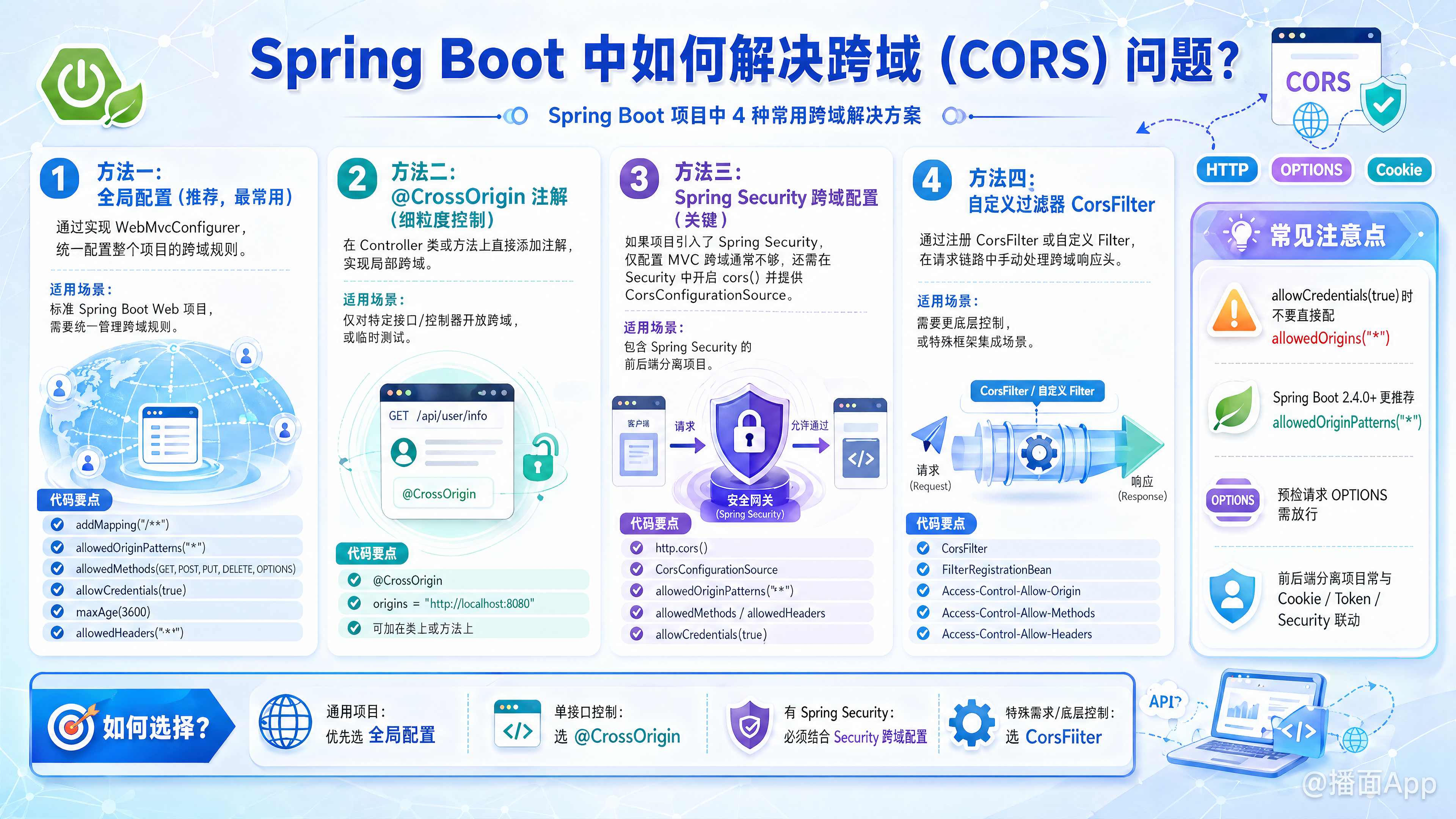
在 Spring Boot 中解决跨域(CORS, Cross-Origin Resource Sharing)问题主要有以下 4 种常用方法。根据你的项目架构(是否包含 Spring Security)和需求粒度,选择最合适的一种。
方法一:全局配置(推荐,最常用)
这是最通用的方式,通过实现 WebMvcConfigurer 接口,一次性配置整个项目的跨域规则。
适用场景: 标准的 Spring Boot Web 项目,需要统一管理跨域规则。
java
import org.springframework.context.annotation.Configuration;
import org.springframework.web.servlet.config.annotation.CorsRegistry;
import org.springframework.web.servlet.config.annotation.WebMvcConfigurer;

@Configuration
public class CorsConfig implements WebMvcConfigurer {

    @Override
    public void addCorsMappings(CorsRegistry registry) {
        registry.addMapping("/**")                   // 允许跨域访问的路径
                // .allowedOrigins("*")              // SpringBoot 2.4.0 之前使用
                .allowedOriginPatterns("*")          // SpringBoot 2.4.0+ 推荐使用这个(支持通配符且允许携带凭证)
                .allowedMethods("GET", "POST", "PUT", "DELETE", "OPTIONS") // 允许的请求方法
                .allowCredentials(true)              // 是否允许发送 Cookie
                .maxAge(3600)                        // 预检请求(OPTIONS)的缓存时间(秒)
                .allowedHeaders("*");                // 允许的 Header
    }
}
方法二:使用 @CrossOrigin 注解(细粒度控制)
可以在 Controller 类或具体的方法上直接添加注解。
适用场景: 只需要对某个特定的接口或控制器开放跨域,或者临时测试。
java
import org.springframework.web.bind.annotation.CrossOrigin;
import org.springframework.web.bind.annotation.GetMapping;
import org.springframework.web.bind.annotation.RestController;

@RestController
// @CrossOrigin(origins = "*") // 如果加在类上,该类所有方法都支持跨域
public class HelloController {

    @GetMapping("/hello")
    @CrossOrigin(origins = "http://localhost:8080") // 只允许来自 localhost:8080 的请求
    public String hello() {
        return "Hello World";
    }
}
方法三:Spring Security 跨域配置(关键)
如果你的项目中引入了 Spring Security,上述方法一和方法二可能会失效。因为请求会先经过 Spring Security 的过滤器链,如果 Security 拒绝了跨域请求(特别是 OPTIONS 预检请求),请求根本到达不了 Spring MVC 层。
适用场景: 集成了 Spring Security 的项目。
你需要配置 SecurityFilterChain:
java
import org.springframework.context.annotation.Bean;
import org.springframework.context.annotation.Configuration;
import org.springframework.security.config.annotation.web.builders.HttpSecurity;
import org.springframework.security.web.SecurityFilterChain;
import org.springframework.web.cors.CorsConfiguration;
import org.springframework.web.cors.CorsConfigurationSource;
import org.springframework.web.cors.UrlBasedCorsConfigurationSource;
import java.util.Arrays;

@Configuration
public class SecurityConfig {

    @Bean
    public SecurityFilterChain filterChain(HttpSecurity http) throws Exception {
        // 开启跨域支持,并禁用 CSRF(通常前后端分离项目会禁用 CSRF)
        http
            .cors(cors -> cors.configurationSource(corsConfigurationSource()))
            .csrf(csrf -> csrf.disable());

        return http.build();
    }

    // 定义具体的跨域配置 Bean
    @Bean
    public CorsConfigurationSource corsConfigurationSource() {
        CorsConfiguration configuration = new CorsConfiguration();
        configuration.setAllowedOriginPatterns(Arrays.asList("*")); // 允许的域
        configuration.setAllowedMethods(Arrays.asList("GET", "POST", "PUT", "DELETE", "OPTIONS"));
        configuration.setAllowCredentials(true);
        configuration.setAllowedHeaders(Arrays.asList("*"));

        UrlBasedCorsConfigurationSource source = new UrlBasedCorsConfigurationSource();
        source.registerCorsConfiguration("/**", configuration);
        return source;
    }
}
方法四:使用 CorsFilter(过滤器方式)
这是基于 Servlet Filter 的方式,优先级很高。
适用场景: 需要在 Spring MVC 介入之前处理跨域,或者非 Spring MVC 架构。
java
import org.springframework.context.annotation.Bean;
import org.springframework.context.annotation.Configuration;
import org.springframework.web.cors.CorsConfiguration;
import org.springframework.web.cors.UrlBasedCorsConfigurationSource;
import org.springframework.web.filter.CorsFilter;

@Configuration
public class CorsFilterConfig {

    @Bean
    public CorsFilter corsFilter() {
        CorsConfiguration config = new CorsConfiguration();
        config.addAllowedOriginPattern("*");
        config.setAllowCredentials(true);
        config.addAllowedMethod("*");
        config.addAllowedHeader("*");

        UrlBasedCorsConfigurationSource source = new UrlBasedCorsConfigurationSource();
        source.registerCorsConfiguration("/**", config);

        return new CorsFilter(source);
    }
}
常见坑点与总结
allowCredentials(true)与allowedOrigins("*")冲突:- 根据 CORS 规范,如果允许携带凭证(Cookie),
Access-Control-Allow-Origin不能为*,必须是具体的域名。 - 解决: 在 Spring Boot 2.4+ 中,使用
allowedOriginPatterns("*")代替allowedOrigins("*"),Spring 会自动处理反射回具体的 Origin。
- 根据 CORS 规范,如果允许携带凭证(Cookie),
Spring Security 优先级:
- 如果用了 Spring Security,必须在 Security 配置中开启
.cors(),否则即使配置了WebMvcConfigurer也会报 403 错误或跨域失败。
- 如果用了 Spring Security,必须在 Security 配置中开启
OPTIONS 请求:
- 浏览器在发送复杂请求(如带 Header 的 POST)前会先发一个 OPTIONS 预检请求。确保你的拦截器或安全配置放行了 OPTIONS 请求。
最佳实践建议:
- 普通项目: 使用 方法一(WebMvcConfigurer)。
- 安全项目: 使用 方法三(Spring Security 配置)。