 播面
播面 Vue兄弟组件之间如何通信?
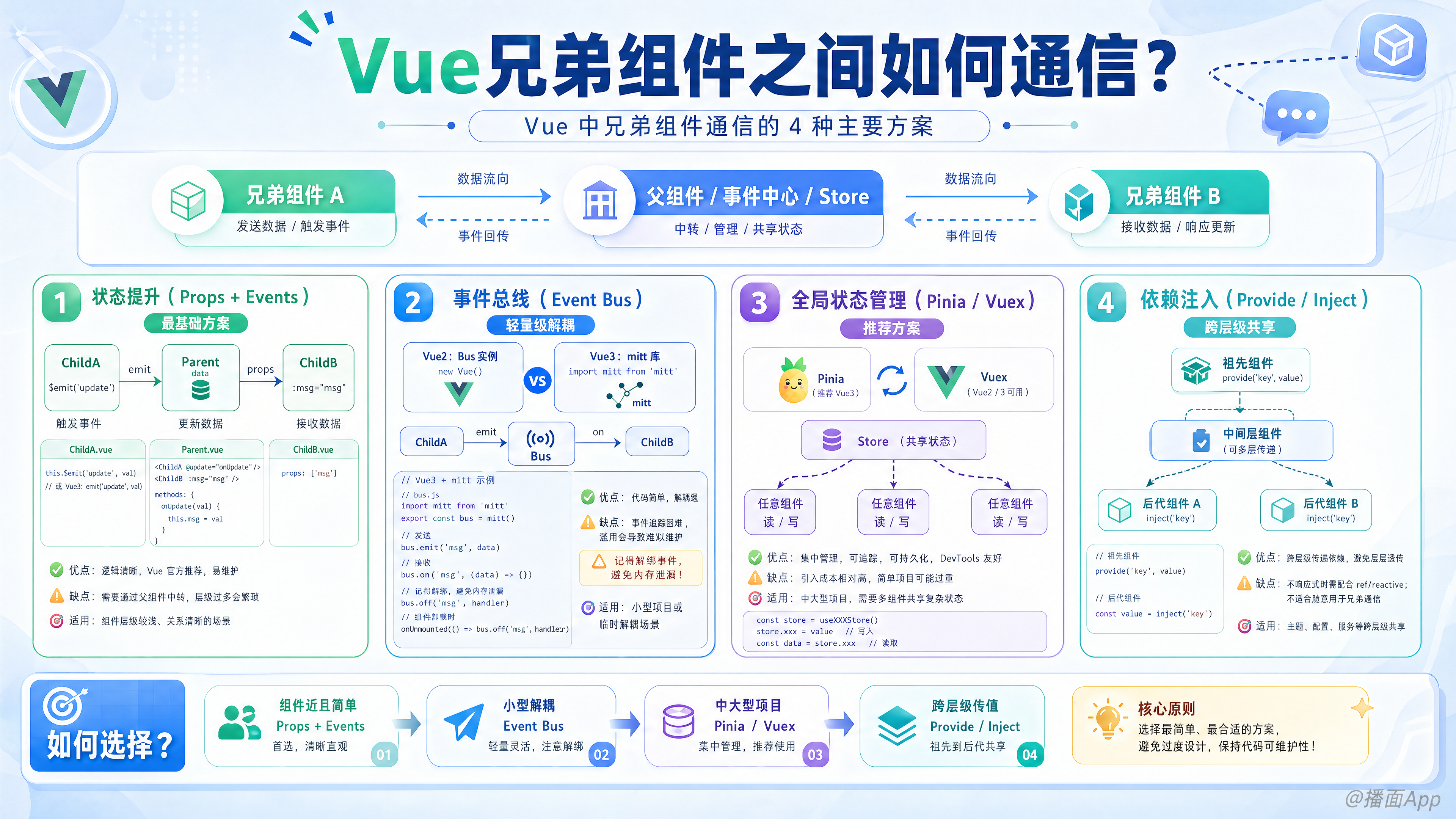
在 Vue 中,兄弟组件(Sibling Components)之间没有直接的父子关系,因此无法直接使用 props 或 $emit 进行通信。
通常有以下 4 种主要方案,根据项目的复杂度选择最合适的一种:
1. 状态提升(Props + Events)—— 最基础方案
原理:利用共同的父组件作为“中间人”。
- 组件 A 通过
$emit发送数据给 父组件。 - 父组件 接收数据并更新自身的
data。 - 父组件 将更新后的数据通过
props传递给 组件 B。
- 适用场景:组件距离近,交互简单,数据量小。
- 优点:逻辑清晰,不依赖第三方库。
- 缺点:如果组件层级深,代码会很冗余。
代码示例 (Vue 3 Script Setup):
plaintext
<!-- Parent.vue -->
<template>
  <!-- 接收 ChildA 的事件,传递给 ChildB -->
  <ChildA @send-msg="handleMsg" />
  <ChildB :msg="message" />
</template>

<script setup>
import { ref } from 'vue';
const message = ref('');

const handleMsg = (val) => {
  message.value = val;
}
</script>
2. 事件总线 (Event Bus) —— 轻量级解耦
原理:创建一个全局空的 Vue 实例(Vue 2)或使用第三方库(Vue 3)作为事件中心,组件 A 向中心发消息,组件 B 监听中心的消息。
Vue 2 写法
使用一个空的 Vue 实例挂载到原型上。
javascript
// main.js
Vue.prototype.$bus = new Vue();

// ComponentA (发送方)
this.$bus.$emit('update-data', 'Hello B');

// ComponentB (接收方)
created() {
  this.$bus.$on('update-data', (msg) => {
    console.log(msg);
  });
},
beforeDestroy() {
  this.$bus.$off('update-data'); // 记得销毁监听,防止内存泄漏
}
Vue 3 写法
Vue 3 移除了 $on, $off 等实例方法,推荐使用第三方库如 mitt。
javascript
// utils/emitter.js
import mitt from 'mitt';
export const emitter = mitt();

// ComponentA (发送方)
import { emitter } from './utils/emitter';
emitter.emit('foo', { a: 'b' });

// ComponentB (接收方)
import { emitter } from './utils/emitter';
import { onUnmounted } from 'vue';

const handler = (evt) => console.log(evt);
emitter.on('foo', handler);

onUnmounted(() => {
  emitter.off('foo', handler);
});- 适用场景:非父子组件通信,且项目规模不大。
- 缺点:数据流向不直观,难以调试,容易造成“幽灵事件”(忘记解绑)。
3. 全局状态管理 (Pinia / Vuex) —— 推荐方案
原理:将共享数据抽离到全局 Store 中,任何组件都可以直接读取或修改 Store 中的数据。
- Vue 3 推荐:Pinia
- Vue 2 推荐:Vuex
Pinia 示例:
javascript
// store/useChatStore.js
import { defineStore } from 'pinia';

export const useChatStore = defineStore('chat', {
  state: () => ({ message: '' }),
  actions: {
    updateMessage(txt) {
      this.message = txt;
    }
  }
});
plaintext
<!-- ComponentA (发送方) -->
<script setup>
import { useChatStore } from '@/store/useChatStore';
const store = useChatStore();
store.updateMessage('Hello from A');
</script>

<!-- ComponentB (接收方) -->
<script setup>
import { useChatStore } from '@/store/useChatStore';
import { storeToRefs } from 'pinia';
const store = useChatStore();
// 响应式读取
const { message } = storeToRefs(store);
</script>- 适用场景:中大型项目,多个组件共享状态,逻辑复杂。
- 优点:数据流清晰,DevTools 调试方便,易于维护。
4. Provide / Inject (共享响应式对象)
原理:虽然通常用于“祖先-后代”通信,但如果父组件 Provide 一个响应式对象(Reactive Object),两个子组件 Inject 这个对象,它们就可以通过修改这个对象来实现通信。
plaintext
<!-- Parent.vue -->
<script setup>
import { provide, reactive } from 'vue';
// 创建一个响应式状态
const sharedState = reactive({
  count: 0,
  updateCount(val) { this.count = val }
});
// 提供给所有子组件
provide('sharedState', sharedState);
</script>

<!-- SiblingA.vue -->
<script setup>
import { inject } from 'vue';
const state = inject('sharedState');
const add = () => state.updateCount(state.count + 1);
</script>

<!-- SiblingB.vue -->
<script setup>
import { inject } from 'vue';
const state = inject('sharedState');
// 这里的 state.count 会自动更新
</script>- 适用场景:不想引入 Pinia/Vuex,但需要跨层级或兄弟间共享状态的简单场景。
总结:该选哪种?
| 方案 | 复杂度 | 推荐场景 | 备注 |
|---|---|---|---|
| 状态提升 (Props/Emit) | ⭐ | 简单的兄弟组件 | 最符合 Vue 单向数据流思想 |
| Pinia / Vuex | ⭐⭐⭐ | 中大型应用 | 最推荐,易维护,可扩展 |
| Provide / Inject | ⭐⭐ | 插件开发或局部共享 | 避免滥用,否则数据来源不清晰 |
| Event Bus (Mitt) | ⭐⭐ | 跨级通信且不想用 Store | 慎用,维护成本高 |