 播面
播面 Elasticsearch如何实现精确匹配、模糊匹配和前缀匹配?
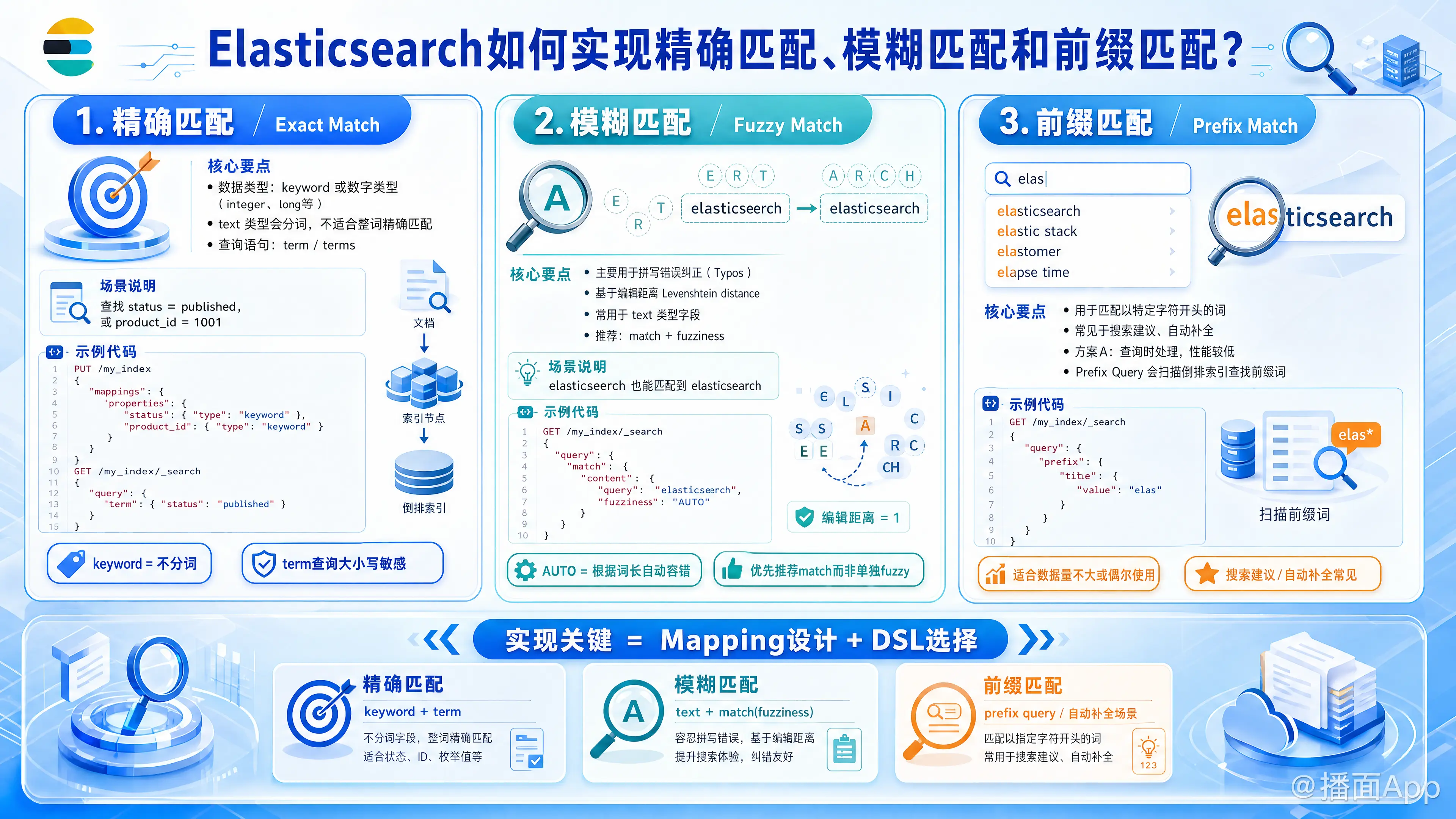
在 Elasticsearch (ES) 中,实现精确匹配、模糊匹配和前缀匹配,关键在于数据类型的设计(Mapping)以及查询语句(DSL)的选择。
以下是针对这三种场景的详细实现方案:
1. 精确匹配 (Exact Match)
精确匹配是指搜索的值必须与索引中的值完全一致(包括大小写,除非使用了正规化器)。
核心要点:
- 数据类型:字段类型必须是
keyword,或者数字类型(integer,long等)。如果是text类型,ES 会进行分词,导致无法精确匹配整个字符串。 - 查询语句:使用
term或terms查询。
实现方式:
场景:查找状态为 "published" 的文章,或者查找 ID 为 1001 的用户。
json
// 1. 定义 Mapping (推荐)
PUT /my_index
{
  "mappings": {
    "properties": {
      "status": {
        "type": "keyword" // 关键:不分词
      },
      "product_id": {
        "type": "keyword"
      }
    }
  }
}

// 2. 查询 DSL
GET /my_index/_search
{
  "query": {
    "term": {
      "status": "published" // 完全匹配,大小写敏感
    }
  }
}
注意:如果你对 text 类型的字段做 term 查询,通常查不到结果,因为 text 字段存入倒排索引时已经被分词(如 "Apple" 变成了 "apple"),而 term 查询不会对搜索词进行分词。
2. 模糊匹配 (Fuzzy Match)
模糊匹配主要用于处理拼写错误(Typos),基于编辑距离(Levenshtein distance)算法。
核心要点:
- 数据类型:通常用于
text类型字段。 - 查询语句:使用
match查询配合fuzziness参数,或直接使用fuzzy查询。
实现方式:
场景:用户搜索 "elasticseerch" (拼写错误),希望能搜到 "elasticsearch"。
json
// 查询 DSL
GET /my_index/_search
{
  "query": {
    "match": {
      "content": {
        "query": "elasticseerch",
        "fuzziness": "AUTO"
      }
    }
  }
}
fuzziness: "AUTO":这是最佳实践。ES 会根据词的长度自动决定允许错误的字符数(例如:短词必须精确,长词允许错1-2个字母)。fuzzy查询:虽然有专门的fuzzy查询类型,但通常建议使用带有 fuzziness 参数的match查询,因为match查询还能享受分析器(Analyzer)带来的好处。
3. 前缀匹配 (Prefix Match)
前缀匹配是指匹配以特定字符开头的词。这在“搜索建议”或“自动补全”场景中非常常见。
方案 A:查询时处理 (Search-time) - 性能较低
适用于数据量不大或偶尔使用的场景。
- Prefix Query: 扫描倒排索引,查找所有以指定前缀开头的词。json
GET /my_index/_search { "query": { "prefix": { "title": { "value": "elas" // 匹配 elastic, elasticsearch 等 } } } } - Match Phrase Prefix: 适合短语前缀匹配(如 "quick brown f")。json
GET /my_index/_search
{
  "query": {
    "match_phrase_prefix": {
      "title": "quick brown f"
    }
  }
}
方案 B:索引时处理 (Index-time) - 高性能 (推荐)
如果数据量大且对性能要求高(如即时搜索),应使用 N-gram 技术,用空间换时间。
核心思想:使用 edge_ngram 分词器,在数据写入时就把前缀切分好。
定义 Settings 和 Mapping:
jsonPUT /my_autocomplete_index { "settings": { "analysis": { "analyzer": { "autocomplete_analyzer": { "tokenizer": "autocomplete_tokenizer", "filter": ["lowercase"] } }, "tokenizer": { "autocomplete_tokenizer": { "type": "edge_ngram", "min_gram": 2, "max_gram": 10, "token_chars": ["letter", "digit"] } } } }, "mappings": { "properties": { "title": { "type": "text", "analyzer": "autocomplete_analyzer", // 写入时:切分成 el, ela, elas... "search_analyzer": "standard" // 搜索时:用户搜 "elas",直接匹配词项 } } } }查询:
此时不需要用prefix查询,直接用普通的match查询即可,因为 "elas" 已经作为一个完整的 token 存在于索引中了。jsonGET /my_autocomplete_index/_search { "query": { "match": { "title": "elas" } } }
总结对比表
| 匹配类型 | 适用场景 | 字段类型 | 推荐查询 DSL | 性能 |
|---|---|---|---|---|
| 精确匹配 | ID、状态码、标签、枚举值 | keyword |
term, terms |
⭐⭐⭐⭐⭐ (极快) |
| 模糊匹配 | 容错搜索、拼写纠错 | text |
match (with fuzziness) |
⭐⭐⭐ (较慢,计算量大) |
| 前缀匹配 | 自动补全、输入联想 | text |
prefix (简单场景)edge_ngram + match (高性能场景) |
prefix: ⭐⭐ (慢)edge_ngram: ⭐⭐⭐⭐⭐ (快) |