 播面
播面 如何在 Spring Cloud Gateway 中实现统一的鉴权(认证与授权)?
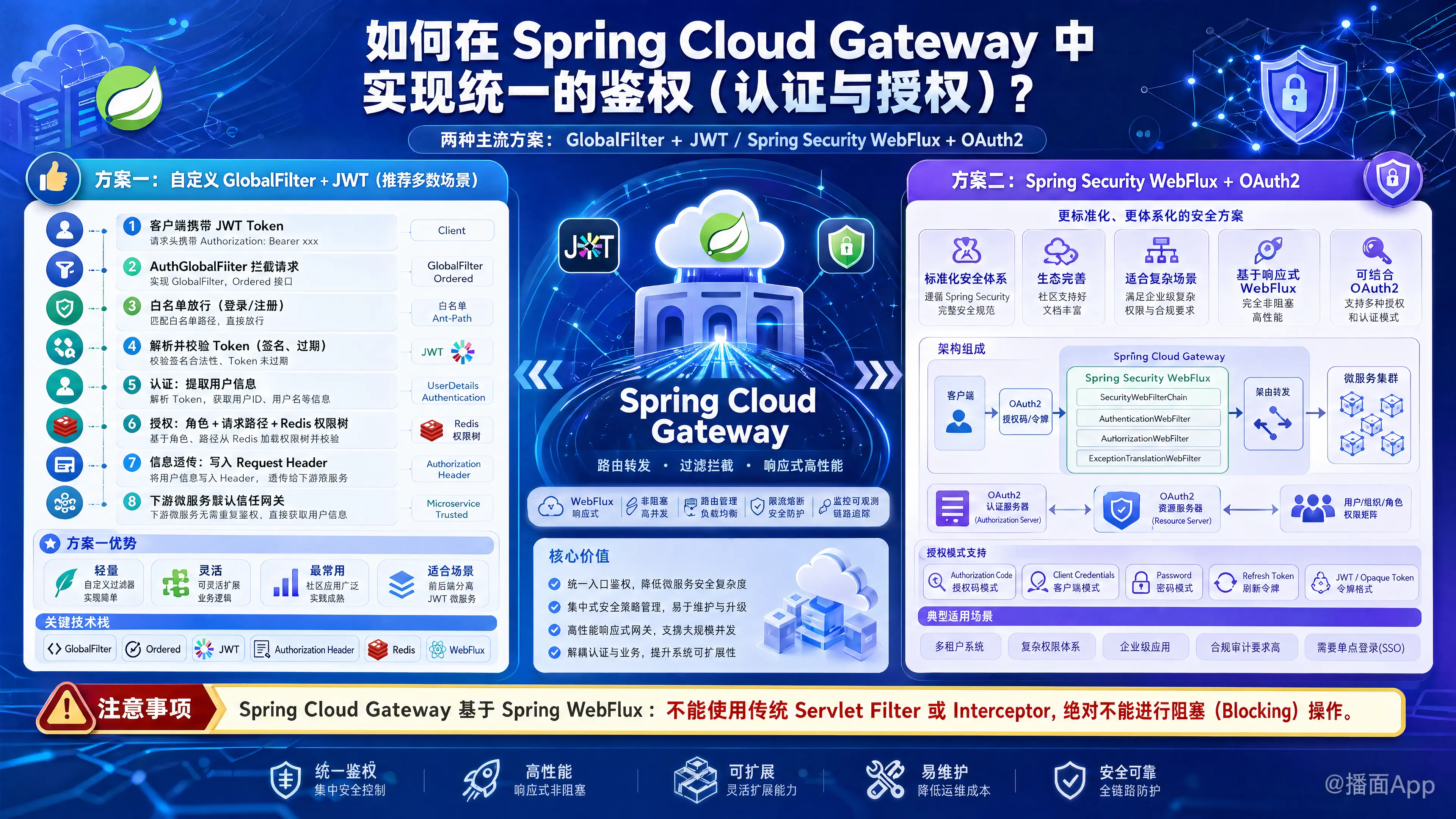
在 Spring Cloud Gateway 中实现统一的鉴权(认证与授权),通常有两种主流方案:
方案一:基于自定义全局过滤器(GlobalFilter)+ JWT(轻量、灵活、最常用)
方案二:整合 Spring Security WebFlux + OAuth2(标准、生态好、适合复杂场景)
因为 Spring Cloud Gateway 底层是基于 Spring WebFlux 的响应式编程模型,不能使用传统的 Servlet Filter 或拦截器(Interceptor),并且绝对不能有阻塞(Blocking)操作。
下面分别详细介绍这两种方案的实现方式。
方案一:基于自定义 GlobalFilter + JWT(推荐多数场景)
这种方式不需要引入庞大的 Spring Security,完全由自己控制逻辑,适合前后端分离、基于 JWT 令牌的微服务架构。
1. 架构流程
- 客户端发起请求,携带 JWT Token(通常在 Header 的
Authorization中)。 - Gateway 的
AuthGlobalFilter拦截请求。 - 判断是否是白名单(如登录、注册接口),是则直接放行。
- 解析并校验 Token(签名是否正确、是否过期)。
- 认证(Authentication): 从 Token 中提取用户信息。
- 授权(Authorization): 根据用户角色和请求路径,判断是否有权限(可结合 Redis 缓存的权限树)。
- 信息透传: 将用户信息写入 Request Header,路由到下游微服务。
- 下游微服务直接从 Header 获取用户信息,默认信任网关,不再校验 Token。
2. 代码实现
依赖引入:
<!-- JWT 解析 -->
<dependency>
    <groupId>io.jsonwebtoken</groupId>
    <artifactId>jjwt</artifactId>
    <version>0.9.1</version>
</dependency>
编写全局过滤器:
import org.springframework.cloud.gateway.filter.GatewayFilterChain;
import org.springframework.cloud.gateway.filter.GlobalFilter;
import org.springframework.core.Ordered;
import org.springframework.core.io.buffer.DataBuffer;
import org.springframework.http.HttpStatus;
import org.springframework.http.server.reactive.ServerHttpRequest;
import org.springframework.http.server.reactive.ServerHttpResponse;
import org.springframework.stereotype.Component;
import org.springframework.util.AntPathMatcher;
import org.springframework.web.server.ServerWebExchange;
import reactor.core.publisher.Mono;

import java.nio.charset.StandardCharsets;
import java.util.Arrays;
import java.util.List;

@Component
public class AuthGlobalFilter implements GlobalFilter, Ordered {

    // 放行的白名单路径
    private static final List<String> WHITE_LIST = Arrays.asList("/api/auth/login", "/api/auth/register");
    private final AntPathMatcher pathMatcher = new AntPathMatcher();

    @Override
    public Mono<Void> filter(ServerWebExchange exchange, GatewayFilterChain chain) {
        ServerHttpRequest request = exchange.getRequest();
        String path = request.getURI().getPath();

        // 1. 白名单放行
        if (isWhiteList(path)) {
            return chain.filter(exchange);
        }

        // 2. 获取 Token
        String token = request.getHeaders().getFirst("Authorization");
        if (token == null || !token.startsWith("Bearer ")) {
            return unauthorizedResponse(exchange, "缺少凭证");
        }
        token = token.replace("Bearer ", "");

        try {
            // 3. 解析 Token (这里使用你自己的 JWT 工具类)
            Claims claims = JwtUtils.parseToken(token);
            String userId = claims.get("userId", String.class);
            String role = claims.get("role", String.class);

            // 4. 授权判断 (RBAC)
            // 示例:访问 /api/admin/ 需要 ADMIN 角色
            if (pathMatcher.match("/api/admin/", path) && !"ADMIN".equals(role)) {
                return forbiddenResponse(exchange, "权限不足");
            }

            // 5. 将用户信息放入请求头,透传给下游微服务
            ServerHttpRequest mutatedRequest = request.mutate()
                    .header("X-User-Id", userId)
                    .header("X-User-Role", role)
                    .build();

            ServerWebExchange mutatedExchange = exchange.mutate().request(mutatedRequest).build();

            // 6. 放行到下游
            return chain.filter(mutatedExchange);

        } catch (Exception e) {
            // Token 过期或无效
            return unauthorizedResponse(exchange, "凭证无效或已过期");
        }
    }

    private boolean isWhiteList(String path) {
        return WHITE_LIST.stream().anyMatch(pattern -> pathMatcher.match(pattern, path));
    }

    // 构建 401 响应 (响应式写法)
    private Mono<Void> unauthorizedResponse(ServerWebExchange exchange, String msg) {
        ServerHttpResponse response = exchange.getResponse();
        response.setStatusCode(HttpStatus.UNAUTHORIZED);
        response.getHeaders().add("Content-Type", "application/json;charset=UTF-8");
        String body = String.format("{\"code\": 401, \"message\": \"%s\"}", msg);
        DataBuffer buffer = response.bufferFactory().wrap(body.getBytes(StandardCharsets.UTF_8));
        return response.writeWith(Mono.just(buffer));
    }

    // 构建 403 响应
    private Mono<Void> forbiddenResponse(ServerWebExchange exchange, String msg) {
        ServerHttpResponse response = exchange.getResponse();
        response.setStatusCode(HttpStatus.FORBIDDEN);
        response.getHeaders().add("Content-Type", "application/json;charset=UTF-8");
        String body = String.format("{\"code\": 403, \"message\": \"%s\"}", msg);
        DataBuffer buffer = response.bufferFactory().wrap(body.getBytes(StandardCharsets.UTF_8));
        return response.writeWith(Mono.just(buffer));
    }

    @Override
    public int getOrder() {
        // 优先级,数字越小优先级越高
        return -100;
    }
}
方案二:整合 Spring Security WebFlux + OAuth2/JWT
如果你的系统使用标准的 OAuth2.0 或 OIDC 协议,直接使用 Spring Security 是更规范的选择。
1. 引入依赖
<dependency>
    <groupId>org.springframework.boot</groupId>
    <artifactId>spring-boot-starter-security</artifactId>
</dependency>
<dependency>
    <groupId>org.springframework.boot</groupId>
    <artifactId>spring-boot-starter-oauth2-resource-server</artifactId>
</dependency>
2. 安全配置类(Reactive 方式)
必须使用 @EnableWebFluxSecurity 而不是传统的 @EnableWebSecurity。
import org.springframework.context.annotation.Bean;
import org.springframework.context.annotation.Configuration;
import org.springframework.security.config.annotation.web.reactive.EnableWebFluxSecurity;
import org.springframework.security.config.web.server.ServerHttpSecurity;
import org.springframework.security.web.server.SecurityWebFilterChain;

@Configuration
@EnableWebFluxSecurity
public class GatewaySecurityConfig {

    @Bean
    public SecurityWebFilterChain springSecurityFilterChain(ServerHttpSecurity http) {
        http
            .csrf(ServerHttpSecurity.CsrfSpec::disable) // 网关一般不需要 CSRF
            .authorizeExchange(exchanges -> exchanges
                .pathMatchers("/api/auth/").permitAll() // 白名单放行
                .pathMatchers("/api/admin/").hasRole("ADMIN") // 授权:需要 ADMIN 角色
                .anyExchange().authenticated() // 认证:其他请求均需登录
            )
            // 配置作为 OAuth2 资源服务器,并使用 JWT
            .oauth2ResourceServer(oauth2 -> oauth2
                .jwt(jwt -> jwt.jwtAuthenticationConverter(grantedAuthoritiesExtractor()))
            );
        return http.build();
    }

    // 提取 JWT 中的权限/角色(根据你的 JWT 结构自定义)
    @Bean
    public ReactiveJwtAuthenticationConverterAdapter grantedAuthoritiesExtractor() {
        JwtGrantedAuthoritiesConverter jwtGrantedAuthoritiesConverter = new JwtGrantedAuthoritiesConverter();
        // 假设角色在 JWT 的 "roles" 字段中,且自带 "ROLE_" 前缀
        jwtGrantedAuthoritiesConverter.setAuthoritiesClaimName("roles");
        jwtGrantedAuthoritiesConverter.setAuthorityPrefix("");

        JwtAuthenticationConverter jwtAuthenticationConverter = new JwtAuthenticationConverter();
        jwtAuthenticationConverter.setJwtGrantedAuthoritiesConverter(jwtGrantedAuthoritiesConverter);

        return new ReactiveJwtAuthenticationConverterAdapter(jwtAuthenticationConverter);
    }
}
3. 配置 JWT 公钥或 JWK Set URI(在 application.yml 中)
spring:
  security:
    oauth2:
      resourceserver:
        jwt:
          # 认证服务器的 JWK 端点,网关会自动去拉取公钥验证 JWT 签名
          jwk-set-uri: http://auth-service/oauth2/jwks
4. 将 Token 透传给下游(TokenRelay)
在 Spring Cloud Gateway 中,只需在路由配置中加上 TokenRelay 过滤器,网关就会自动把 JWT 传递给下游微服务。
spring:
  cloud:
    gateway:
      routes:
        - id: order-service
          uri: lb://order-service
          predicates:
            - Path=/api/order/
          filters:
            - TokenRelay= # 关键:将 Token 向下透传
动态权限控制(进阶)
在实际项目中,权限往往是动态配置在数据库里的(URL -> 角色映射)。
对于 方案一:可以在 GlobalFilter 中注入 Redis/本地缓存,拦截时查询当前 URL 需要什么权限,再和 JWT 解析出的权限做比对。
对于 方案二:可以自定义 ReactiveAuthorizationManager<AuthorizationContext> 来替代 .hasRole() 进行动态权限校验。
千万注意响应式编程中的阻塞问题:
如果权限数据在数据库里,不要在 Gateway 的线程里直接使用传统的 MyBatis/JPA 查询数据库。你应该:
- 服务启动时,将权限规则加载到 Redis 或网关本地内存。
- 网关使用
ReactiveRedisTemplate异步读取 Redis。 - 如果非要查数据库,必须使用 R2DBC(响应式数据库驱动),或者把 JDBC 阻塞调用包装在
subscribeOn(Schedulers.boundedElastic())中。
总结与最佳实践
- 统一拦截点: 鉴权逻辑只在 Gateway 进行。
- 信任域隔离: Gateway 将解析出的 UserID 放入 Header 传给下游微服务。下游微服务不应该暴露在外网,只允许 Gateway 访问。下游服务通过拦截器读取 Header 中的 UserID 即可,无需再次解析 Token。
- 防止伪造 Header: 可以在 Gateway 配置一个专门的 Filter,在接收外部请求时,清空外部恶意伪造的
X-User-IdHeader,确保这个 Header 只能由 Gateway 自己写入。javarequest.mutate().headers(httpHeaders -> httpHeaders.remove("X-User-Id")).build(); - 性能考虑: 尽量使用无状态的 JWT,避免在 Gateway 频繁进行远程 RPC 调用或阻塞式查库,否则会严重拖垮网关的并发能力。